

 E-commerce
 Marketing
 Finance
 Product Engineering
 Data & Engineering Teams
 Sales & GTM
 Pricing & Competitive Research
 Operations & Monitoring
How I built a live YC S26 tracker with Riveter
Abby Grills· CEO, RiveterPublished · Updated
YC S26 Demo Day is here, so I built a small app to make the batch easier to explore. BatchWatch tracks every YC company and layers deeper fields onto the current batch: the revenue companies have publicly reported, repeat YC founders, news mentions, and more. It keeps itself up to date as the directory changes.
You can browse it, or download CSVs of the companies and founders to dig in yourself or drop into Claude.
See it here: ycbatchwatch.com/s26
The whole thing runs on Riveter, and it took very little to stand up. Here is how it works.
What Riveter is
Riveter finds and structures data from the web using AI agents. You describe what you need in plain language, and its agents search the live web, navigate to the data, and extract it, returning a finished, structured dataset through a single API. You can run it once or keep it refreshed on a schedule.
BatchWatch uses two of Riveter’s tools: Extractions to pull the full company list, and Enrichments to build profiles on top of it. The extraction covers all of YC. The enrichments run deeper on the current batch, where the extra fields are most useful right now.
Step 1: Extract every YC company
The first job is getting the complete list of companies from ycombinator.com/companies.
A Riveter Extraction takes a starting URL and a prompt, then reverse engineers the source to figure out how to navigate it: dropdowns, filters, infinite scroll, clicking through pages, all the interactions that normally force you into slow, brittle browser automation. Once it works out the path, it prepares a script that runs with no AI in the loop, which makes each run fast and cheap.
The result: the full directory, 6,204 records, in about two seconds per run.
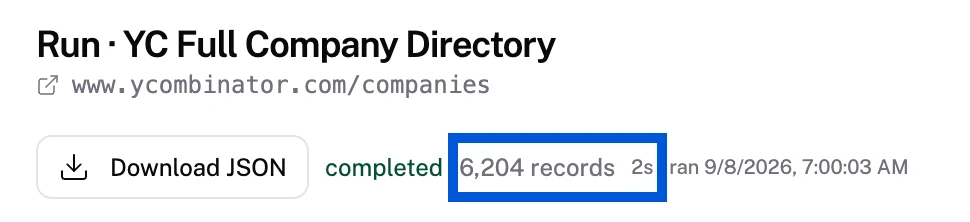
Because a run is that fast and cheap, you can schedule it often and set up monitors to watch the source for changes. And the Extraction is self-healing: if the site changes in a way that would break the plan, the plan regenerates itself. That is what lets BatchWatch capture edits to existing companies and pick up newly listed ones without me babysitting it.
Step 2: Enrich a profile for every company
Extractions get the list. Enrichments turn each row into a full profile.
An Enrichment adds custom columns to whatever input data you pass in. For each company in the current batch, Riveter pulls the description, logo image URL, tags, LinkedIn and X profile URLs, reported revenue, launch posts, founders, and founder details, among other fields. Every time the extraction finds a new company, it flows straight into this pre-configured enrichment, so the same, consistent set of data gets collected for every one automatically.
Step 3: Enrich a profile for every founder
Founders get the same treatment. Every founder Riveter finds is passed through an enrichment that researches and scores them. It reads their LinkedIn profile to understand their education, previous employers, and companies they have founded before. It flags whether they are a repeat YC founder, sizes up their LinkedIn and X followings, and looks for signals like a previous successful exit.
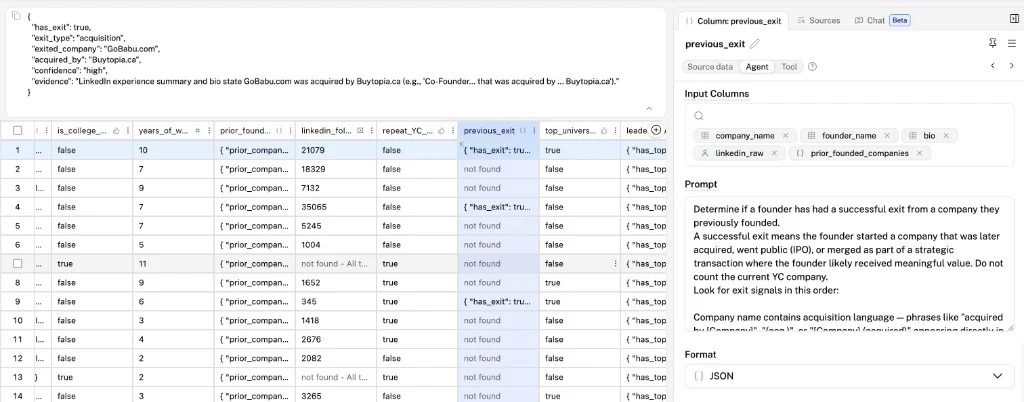
Because it is the same enrichment running on every row, the founder data stays consistent across the entire batch, which is exactly what you want when you are comparing hundreds of people at once.
Why this was easy
Those are just a few of the tools keeping BatchWatch fresh and accurate. The broader point is that Riveter makes it straightforward to spin up data pipelines quickly and cheaply that return consistent, structured data, and keep returning it as the underlying sources change.
Completeness and fill rate are where Riveter is built to win. In our own testing on tasks like this one, where the goal is capturing every company and every founder rather than a sample, it returns more complete results than index-based tools like Exa and Parallel, and holds up better when sites change.
Want to try it on your own data? Grab time with me or sign up at riveterhq.com.